How to Download Instagram Videos and Photos with SaveTheVideo
Looking to download videos and photos from Instagram but don't know where to start? SaveTheVideo is the perfect solution for you. This online tool allows you to easily save any Instagram content directly to your phone or computer in just a few simple steps.
Our tool is designed to work directly in your web browser without requiring any software installation. Simply copy and paste the Instagram link into the input field on SaveTheVideo.App, and we will handle the rest for you.
Follow the step-by-step instructions below to download Instagram photos and videos online without installing any software.
Step 1: Copy the Instagram Post Link
Find the photo or video you want to download, tap the three-dot icon (●●●) and select Copy link.
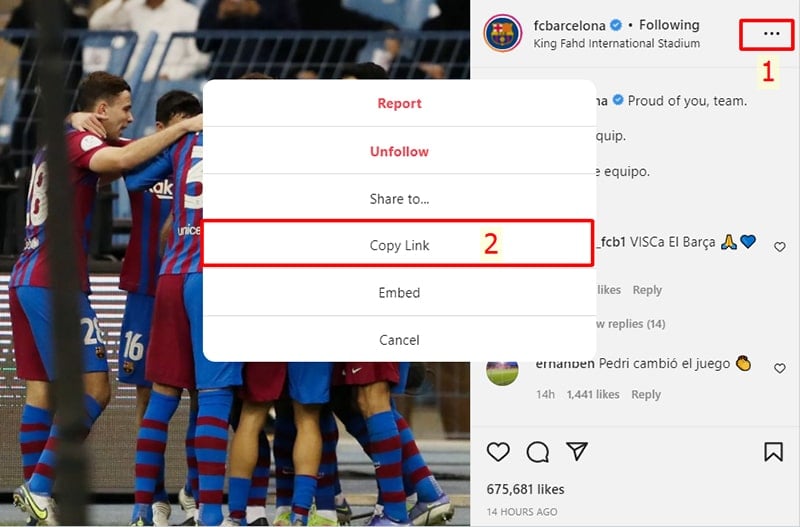
Step 2: Paste the Instagram link into the SaveTheVideo input box
Open your browser and visit the website: SaveTheVideo.App
Paste the Instagram link you just copied into the input box and press the Download button.
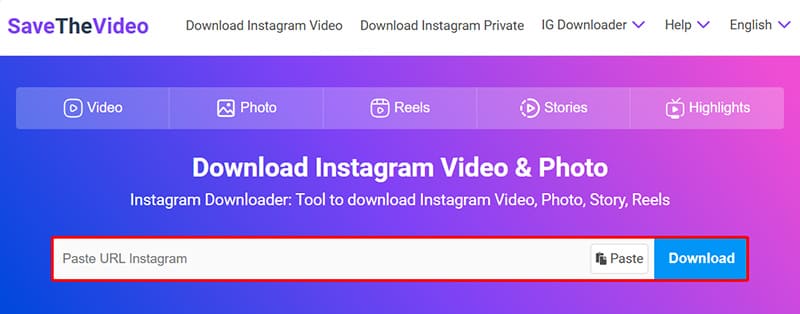
Step 3: Save Instagram videos and photos to your device
Wait a few seconds for our server to process the request. Once the result appears, you can save the photo or video to your device in high resolution.
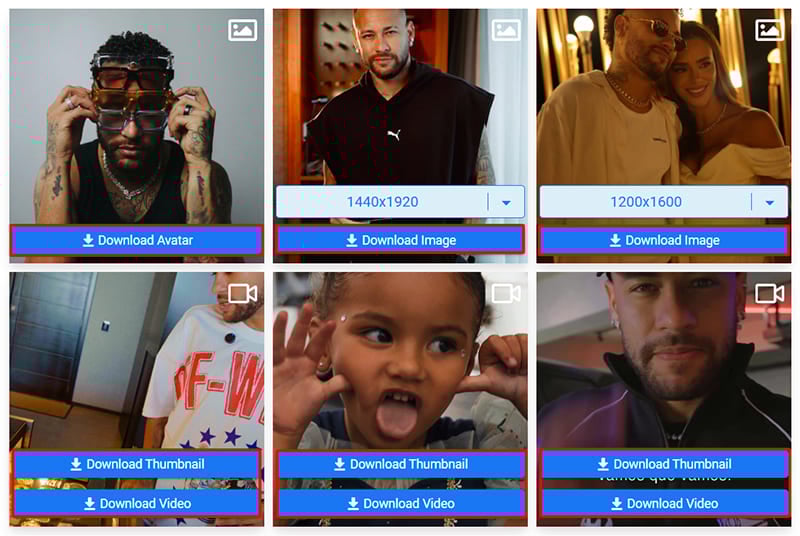
By default, we prioritize downloading content in the best quality available. However, the final quality depends on the resolution of the original post uploaded by the user.